

Pixiv - KiraraShss

Welcome to my blog
1444 words
7 minutes
Windows Kernel Exploitation 練習
WinDBG 基本操作 - 練習手動把 VA 轉成 PA
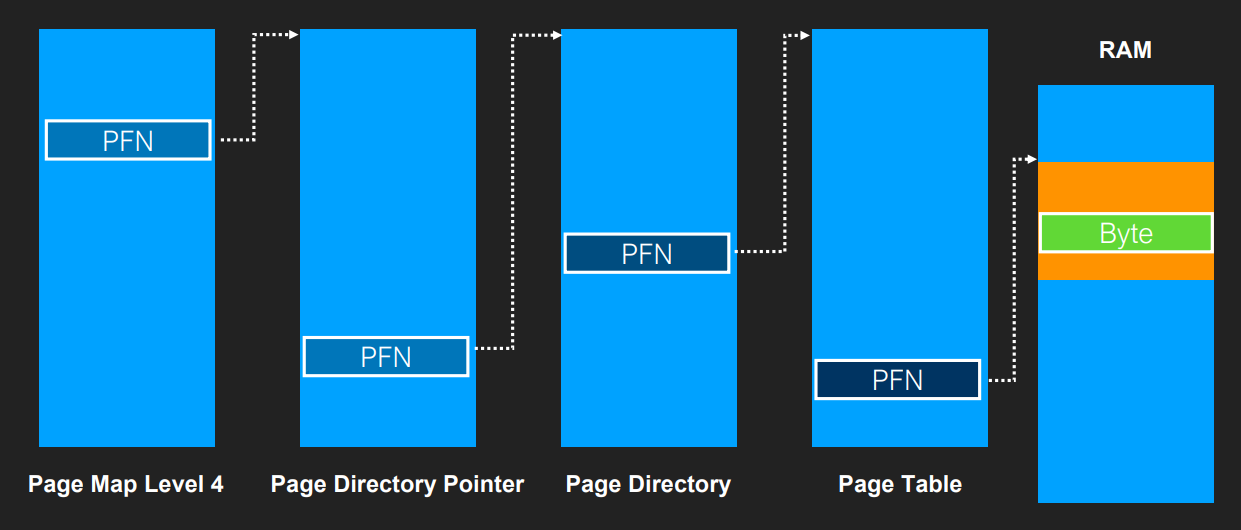
Virtual Address的組成:
| PML4 Index | PDPT Index | PD Index | PT Index | Page Offset |
|---|---|---|---|---|
| Bits 47-39 | Bits 38-30 | Bits 29-21 | Bits 20-12 | Bits 11-0 |
| 9 bits | 9 bits | 9 bits | 9 bits | 12 bits |
隨便拿一個位址做轉換的目標:
2: kd> lm m ntBrowse full module liststart end module namefffff806`77e00000 fffff806`79250000 nt (pdb symbols) c:\symbols\ntkrnlmp.pdb\0385A3E51169BA7F84716B1C792977F71\ntkrnlmp.pdb讀取 CR3
2: kd> r cr3cr3=00000000001ae002分別拿四個 Index
2: kd> ? (fffff806`77e00000 >> c) & 1ffEvaluate expression: 0 = 00000000`000000002: kd> ? (fffff806`77e00000 >> 15) & 1ffEvaluate expression: 447 = 00000000`000001bf2: kd> ? (fffff806`77e00000 >> 1e) & 1ffEvaluate expression: 25 = 00000000`000000192: kd> ? (fffff806`77e00000 >> 27) & 1ffEvaluate expression: 496 = 00000000`000001f0- PT Index: 0
- PD Index: 0x1bf
- PDPT Index: 0x19
- PML4 Index: 0x1f0
爬Page Table
先爬 PML4:
- CR3 + PML4_Index * 8
!dq抓 PML4 的內容- 爬出來的
& 0ffffffffff000清掉最低三位
2: kd> ? 00000000001ae002 + (00000000`000001f0 * 8)Evaluate expression: 1765250 = 00000000`001aef822: kd> !dq 00000000`001aef82 L1# 1aef80 00000000`001d00632: kd> ? 00000000`001d0063 & 0ffffffffff000Evaluate expression: 1900544 = 00000000`001d0000再用抓出來的結果當作 base 去爬 PDPT:
2: kd> ? 00000000`001d0000 + (00000000`00000019 * 8)Evaluate expression: 1900744 = 00000000`001d00c82: kd> !dq 00000000`001d00c8 L1# 1d00c8 00000000`0025a0632: kd> ? 00000000`0025a063 & 0ffffffffff000Evaluate expression: 2465792 = 00000000`0025a000再用相同的步驟爬 PD:
2: kd> ? 00000000`0025a000 + (00000000`000001bf * 8)Evaluate expression: 2469368 = 00000000`0025adf82: kd> !dq 00000000`0025adf8 L1# 25adf8 8a000001`004000a1注意到 PD 的內容, a1 為 1010 0001, bit7為1, 因此為 Large Page, 用 Large Page 的轉換方法:
2: kd> ? (8a000001`004000a1 & 0fffffffffe00000) + (fffff806`77e00000 & 1fffff)Evaluate expression: 720575944678440960 = 0a000001`00400000最後可以用記憶體內容檢查轉換結果:
2: kd> db fffff806`77e00000fffff806`77e00000 4d 5a 90 00 03 00 00 00-04 00 00 00 ff ff 00 00 MZ..............fffff806`77e00010 b8 00 00 00 00 00 00 00-40 00 00 00 00 00 00 00 ........@.......fffff806`77e00020 00 00 00 00 00 00 00 00-00 00 00 00 00 00 00 00 ................fffff806`77e00030 00 00 00 00 00 00 00 00-00 00 00 00 18 01 00 00 ................fffff806`77e00040 0e 1f ba 0e 00 b4 09 cd-21 b8 01 4c cd 21 54 68 ........!..L.!Thfffff806`77e00050 69 73 20 70 72 6f 67 72-61 6d 20 63 61 6e 6e 6f is program cannofffff806`77e00060 74 20 62 65 20 72 75 6e-20 69 6e 20 44 4f 53 20 t be run in DOSfffff806`77e00070 6d 6f 64 65 2e 0d 0d 0a-24 00 00 00 00 00 00 00 mode....$.......2: kd> !db 000001`00400000#100400000 4d 5a 90 00 03 00 00 00-04 00 00 00 ff ff 00 00 MZ..............#100400010 b8 00 00 00 00 00 00 00-40 00 00 00 00 00 00 00 ........@.......#100400020 00 00 00 00 00 00 00 00-00 00 00 00 00 00 00 00 ................#100400030 00 00 00 00 00 00 00 00-00 00 00 00 18 01 00 00 ................#100400040 0e 1f ba 0e 00 b4 09 cd-21 b8 01 4c cd 21 54 68 ........!..L.!Th#100400050 69 73 20 70 72 6f 67 72-61 6d 20 63 61 6e 6e 6f is program canno#100400060 74 20 62 65 20 72 75 6e-20 69 6e 20 44 4f 53 20 t be run in DOS#100400070 6d 6f 64 65 2e 0d 0d 0a-24 00 00 00 00 00 00 00 mode....$.......Windows Programming 練習 - 列舉 User 可使用的所有 Device
使用 Claude 生成, 各家 LLM 生出來的結果應該不會相差太大, 都是使用 pNtOpenDirectoryObject 去開 \\Device 然後用 pNtQueryDirectoryObject 配合 TryOpenDevice 去戳對應的 Device:
bool EnumerateDevices(DeviceStats& stats) { HANDLE hDirectory = NULL; NTSTATUS status;
// Open \Device directory UNICODE_STRING dirName; pRtlInitUnicodeString(&dirName, L"\\Device");
OBJECT_ATTRIBUTES objAttr; InitializeObjectAttributes(&objAttr, &dirName, OBJ_CASE_INSENSITIVE, NULL, NULL);
status = pNtOpenDirectoryObject(&hDirectory, DIRECTORY_QUERY | DIRECTORY_TRAVERSE, &objAttr); if (!NT_SUCCESS(status)) { printf("[-] Failed to open \\Device directory. NTSTATUS: 0x%08X\n", status); return false; }
printf("[+] Successfully opened \\Device directory\n"); printf("[*] Enumerating devices...\n\n");
// Buffer for directory query const ULONG bufferSize = 0x10000; BYTE* buffer = new BYTE[bufferSize]; ULONG context = 0; ULONG returnLength = 0; BOOLEAN restartScan = TRUE;
while (true) { status = pNtQueryDirectoryObject( hDirectory, buffer, bufferSize, FALSE, // Return multiple entries restartScan, &context, &returnLength );
restartScan = FALSE;
if (!NT_SUCCESS(status)) { if (status == STATUS_NO_MORE_ENTRIES) { break; } printf("[-] NtQueryDirectoryObject failed: 0x%08X\n", status); break; }
// Process entries POBJECT_DIRECTORY_INFORMATION info = (POBJECT_DIRECTORY_INFORMATION)buffer;
while (info->Name.Buffer != nullptr) { std::wstring name = UnicodeToWString(info->Name); std::wstring type = UnicodeToWString(info->TypeName);
// Only process Device objects if (type == L"Device") { stats.totalDevices++;
DWORD error = TryOpenDevice(name); stats.errorCounts[error]++;
// Print each device with result wprintf(L"[%4d] \\Device\\%-40s ", stats.totalDevices, name.c_str());
switch (error) { case 0: stats.successCount++; printf("[OK]\n"); break; case ERROR_ACCESS_DENIED: stats.accessDeniedCount++; printf("[ACCESS_DENIED]\n"); break; case ERROR_SHARING_VIOLATION: stats.sharingViolationCount++; printf("[SHARING_VIOLATION]\n"); break; case ERROR_FILE_NOT_FOUND: case ERROR_PATH_NOT_FOUND: stats.notFoundCount++; printf("[NOT_FOUND]\n"); break; case ERROR_INVALID_NAME: stats.invalidNameCount++; printf("[INVALID_NAME]\n"); break; default: stats.otherErrorCount++; printf("[ERROR: %lu]\n", error); break; } }
info++; } }
delete[] buffer; CloseHandle(hDirectory); return true;}Windows Programming 練習 - 與 Driver 互動
安裝 Driver
開啟 Test Mode 之後先安裝 Lab 的 Driver:
C:\Windows\System32>sc create vul binPath=C:\VulDriver.sys type=kernel[SC] CreateService SUCCESS
C:\Windows\System32>sc start vul
SERVICE_NAME: vul TYPE : 1 KERNEL_DRIVER STATE : 4 RUNNING (STOPPABLE, NOT_PAUSABLE, IGNORES_SHUTDOWN) WIN32_EXIT_CODE : 0 (0x0) SERVICE_EXIT_CODE : 0 (0x0) CHECKPOINT : 0x0 WAIT_HINT : 0x0 PID : 0 FLAGS :
C:\Windows\System32>安裝 Debug Symbol
先在 Host 上隨便開一個資料夾, 把 VulDriver.pdb 拷進去之後加到 WinDbg 的 symbol path:
0: kd> .sympath srv*C:\Symbols*https://msdl.microsoft.com/download/symbols;C:\LocalSymbolsSymbol search path is: srv*C:\Symbols*https://msdl.microsoft.com/download/symbols;C:\LocalSymbolsExpanded Symbol search path is: srv*c:\symbols*https://msdl.microsoft.com/download/symbols;c:\localsymbols
************* Path validation summary **************Response Time (ms) LocationDeferred srv*C:\Symbols*https://msdl.microsoft.com/download/symbolsOK C:\LocalSymbols0: kd> .reload /f VulDriver.sys可以 lm 或是直接 x VulDriver!* 看是不是有抓到 symbol:
0: kd> lm vm VulDriverBrowse full module liststart end module namefffff805`30240000 fffff805`30248000 VulDriver (private pdb symbols) c:\localsymbols\VulDriver.pdb Loaded symbol image file: VulDriver.sys Image path: \??\C:\VulDriver.sys Image name: VulDriver.sys Browse all global symbols functions data Symbol Reload Timestamp: Fri Dec 19 20:40:23 2025 (694547B7) CheckSum: 0000DCD0 ImageSize: 00008000 Mapping Form: Loaded Translations: 0000.04b0 0000.04e4 0409.04b0 0409.04e4 Information from resource tables:利用 DeviceIoControl 與 driver 互動
先觀察 IOCTL_VUL_TEST , 發現需滿足以下條件:
- 輸入 magic:
0x13371337 - Output buffer 大小 >= 0x1337 bytes
case IOCTL_VUL_TEST: { if (irpSp->Parameters.DeviceIoControl.InputBufferLength < 4) { status = STATUS_BUFFER_TOO_SMALL; break; } magic = *(ULONG*)Irp->AssociatedIrp.SystemBuffer; if (magic != 0x13371337) { status = STATUS_INVALID_PARAMETER; break; } const wchar_t* msg = L"HelloWorld"; ULONG bytes = (ULONG)((wcslen(msg) + 1) * sizeof(wchar_t));
if (irpSp->Parameters.DeviceIoControl.OutputBufferLength < 0x1337) { status = STATUS_BUFFER_TOO_SMALL; break; } RtlCopyMemory(Irp->AssociatedIrp.SystemBuffer, msg, bytes); info = bytes; status = STATUS_SUCCESS; break; }送出對應的 IOCTL 就能收到 Driver回傳的字串了
DWORD inputBuffer = VUL_MAGIC;
const DWORD outputBufferSize = 0x1337; BYTE* outputBuffer = new BYTE[outputBufferSize]; ZeroMemory(outputBuffer, outputBufferSize);
DWORD bytesReturned = 0;
printf("\n[*] Calling DeviceIoControl...\n");
BOOL success = DeviceIoControl( hDevice, IOCTL_VUL_TEST, &inputBuffer, // Input buffer (magic value) sizeof(inputBuffer), // Input buffer size (4 bytes) outputBuffer, // Output buffer outputBufferSize, // Output buffer size (0x1337) &bytesReturned, // Bytes returned NULL // Not overlapped );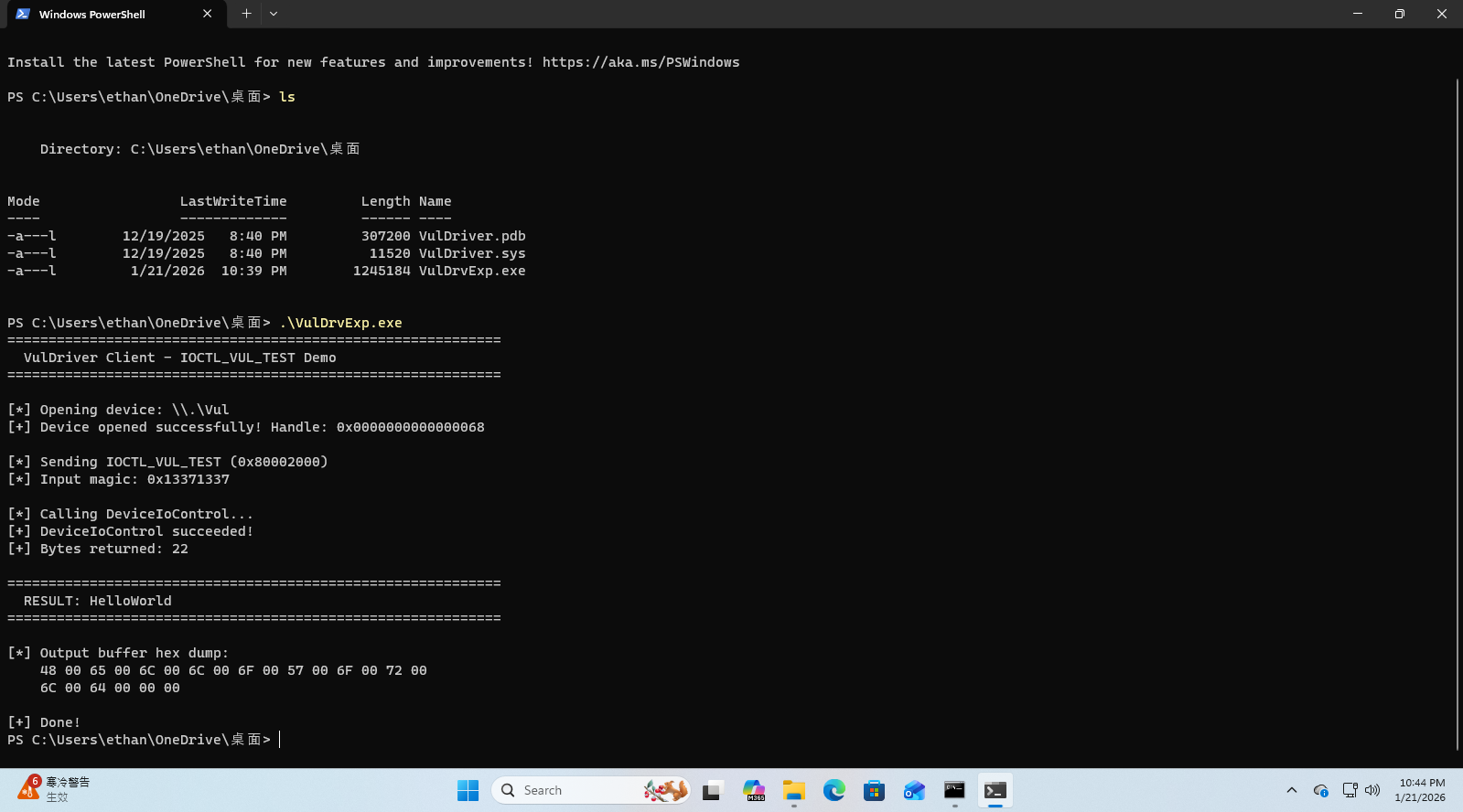
在 VulDriver!VulDeviceControl 上設定 breakpoint, 觀察 IRP 內容:
1: kd> bp VulDriver!VulDeviceControl1: kd> gBreakpoint 0 hitVulDriver!VulDeviceControl:fffff805`30241370 4889542410 mov qword ptr [rsp+10h],rdx1: kd> dt nt!_IRP @rdx +0x000 Type : 0n6 +0x002 Size : 0x118 +0x004 AllocationProcessorNumber : 1 +0x006 Reserved1 : 0 +0x008 MdlAddress : (null) +0x010 Flags : 0x60070 +0x014 Reserved2 : 0 +0x018 AssociatedIrp : <unnamed-tag> +0x020 ThreadListEntry : _LIST_ENTRY [ 0xffffa28c`a1c0b5c0 - 0xffffa28c`a1c0b5c0 ] +0x030 IoStatus : _IO_STATUS_BLOCK +0x040 RequestorMode : 1 '' +0x041 PendingReturned : 0 '' +0x042 StackCount : 1 '' +0x043 CurrentLocation : 1 '' +0x044 Cancel : 0 '' +0x045 CancelIrql : 0 '' +0x046 ApcEnvironment : 0 '' +0x047 AllocationFlags : 0x6 '' +0x048 UserIosb : 0x0000002b`e6b5f470 _IO_STATUS_BLOCK +0x048 IoRingContext : 0x0000002b`e6b5f470 Void +0x050 UserEvent : (null) +0x058 Overlay : <unnamed-tag> +0x068 CancelRoutine : (null) +0x070 UserBuffer : 0x000001d7`5ee21060 Void +0x078 Tail : <unnamed-tag>1: kd> dd poi(@rdx+18) L1ffffa28c`a739e000 13371337Systembuffer 的內容對應到 Magic 0x13371337
Token Stealing 練習
TBD
Windows Kernel Exploitation 練習
https://blog.cyberangel.work/posts/winkrnlpwn/